
Exporting Your Work
Author sovereignty implies the ability to move your work to any other platform without restrictions. LoneWriter facilitates the export of your texts and lore data in standard and open formats.
Available Export Formats
Projects and Drafts
LoneWriter uses optimized formats to ensure that no information is lost during the process:
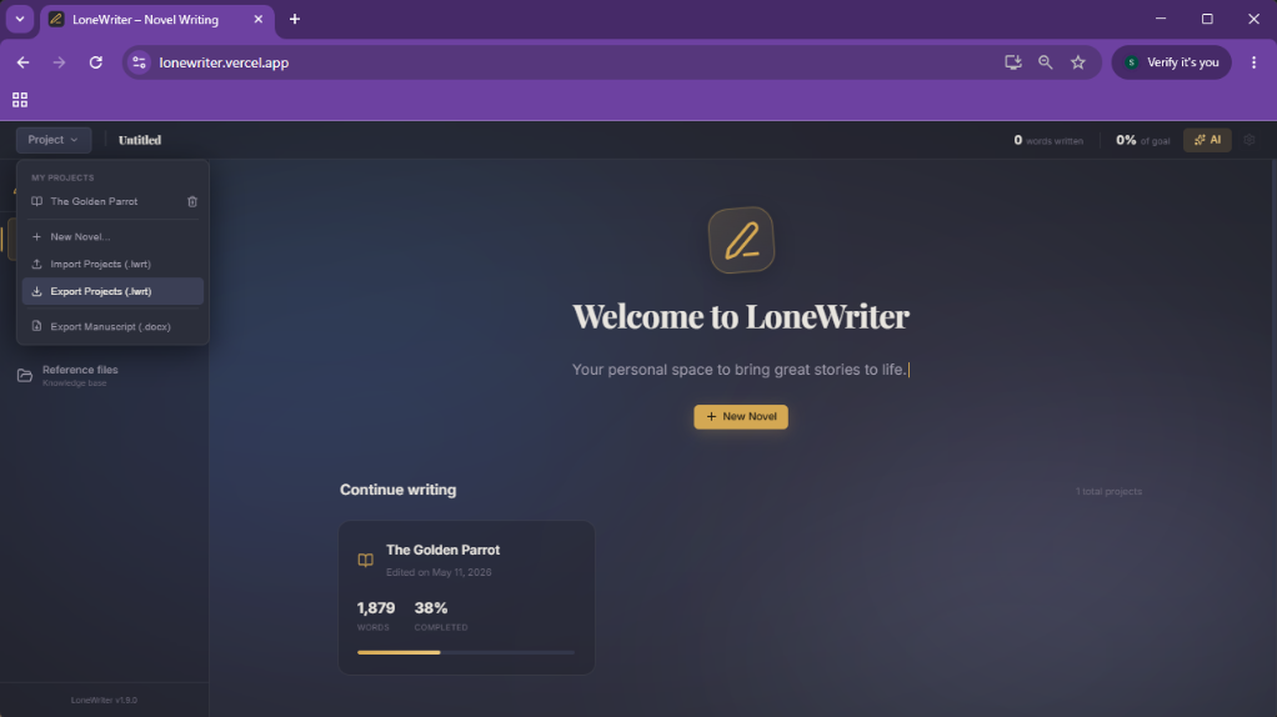
- Project File (.lwrt): This is LoneWriter's native format. It contains a full export of the local database: manuscript, Compendium, Nexus relationships and links, AI settings, and search vectors. This file can be compressed and optionally protected with a password (AES-GCM encryption).
- Manuscript (.docx): Exports the full work in Microsoft Word format, organized by Acts, Chapters, and Scenes. Ideal for professional typesetting or sharing with editors.
How to Perform an Export
- Expand the Project menu (with your work's name) in the sidebar.
- Select Export Projects (.lwrt) for a complete project backup (Lore and Manuscript) or Export Manuscript (.docx) to export the novel's text.
- The file will be automatically downloaded to your computer.
Manual Backups
It is recommended to perform a full export in JSON format after important work sessions. This file contains the entire structure of your universe and can be imported back into LoneWriter at any time, even on a clean browser installation.